

Agraham & Klaus
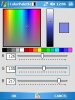
I combined Agraham's ColorDialog and Klaus's ColorPalette module to one library.
I request your permission to publish it.
Thanks.
Edit:
The zip file contains dll & cs files, simple demo program which can be used to see the use of the few methods, and the palette.
The palette should be placed with the application or in directory "images" underneath.
Preset colors can be changed one at a time.
The lib is for use of Desktop and Device, tested for QVGA and VGA.
Edit: - ver 1.1, the palette is embeded in the code, and also I found that a desktop version is required for compilation.
I combined Agraham's ColorDialog and Klaus's ColorPalette module to one library.
I request your permission to publish it.
Thanks.
Edit:
The zip file contains dll & cs files, simple demo program which can be used to see the use of the few methods, and the palette.
The palette should be placed with the application or in directory "images" underneath.
Preset colors can be changed one at a time.
The lib is for use of Desktop and Device, tested for QVGA and VGA.
Edit: - ver 1.1, the palette is embeded in the code, and also I found that a desktop version is required for compilation.
Attachments
Last edited:


