
Better implementation based on B4XPages:
 www.b4x.com
Tutorial was rewritten in April 2018.
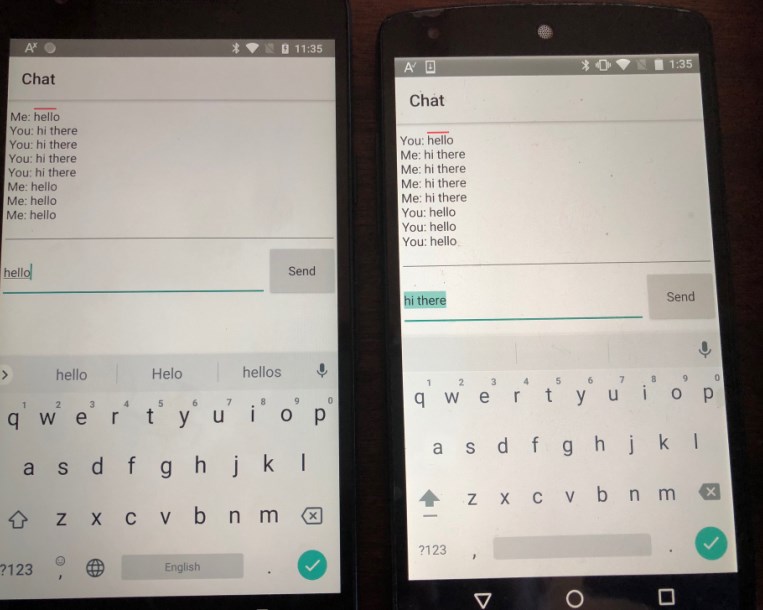
We will create a chat example between two Android devices.
All the non-UI code is implemented in a class named BluetoothManager. It is initialized in Service_Create of the starter service.
It is always better to implement communication related code in a service or a class initialized from a service. This way the communication state is not affected by the activities more complicated state.
The activities call the class methods directly. Calling the activities subs is done with CallSub. Remember that CallSub doesn't do anything if the activity is paused.
The first activity, the main activity, shows two buttons. One for searching other devices and one for listening for connections.
Searching other devices requires a "dangerous" permissions (see the runtime permissions tutorial for more information).
Note that you need to add the permission in the manifest editor:
The second button sends an intent to the OS to make the device discoverable and then calls Serial.Listen.
Once a connection is established:
1. AsyncStreams is initialized in prefix mode (see the AsyncStreams tutorial for more information).
2. The ChatActivity is started.
Notes
- In this example we send text messages. Use B4XSerializator to send more complex types.
[B4XPages] Bluetooth Chat Example
Updated implementation, based on B4XPages of https://www.b4x.com/android/forum/threads/android-bluetooth-bluetoothadmin-tutorial.14768/#content. The code is much simpler compared to the previous example. Note that you can call Serial.Listen without making the device discoverable. This is useful...
www.b4x.com
Tutorial was rewritten in April 2018.
We will create a chat example between two Android devices.
All the non-UI code is implemented in a class named BluetoothManager. It is initialized in Service_Create of the starter service.
It is always better to implement communication related code in a service or a class initialized from a service. This way the communication state is not affected by the activities more complicated state.
The activities call the class methods directly. Calling the activities subs is done with CallSub. Remember that CallSub doesn't do anything if the activity is paused.
The first activity, the main activity, shows two buttons. One for searching other devices and one for listening for connections.
Searching other devices requires a "dangerous" permissions (see the runtime permissions tutorial for more information).
Note that you need to add the permission in the manifest editor:
B4X:
AddPermission(android.permission.ACCESS_FINE_LOCATION)
B4X:
Sub btnSearchForDevices_Click
   rp.CheckAndRequest(rp.PERMISSION_ACCESS_FINE_LOCATION)
   Wait For Activity_PermissionResult (Permission As String, Result As Boolean)
   If Result = False Then
       ToastMessageShow("No permission...", False)
       Return
   End If
   Starter.Manager.SearchForDevices
End Sub
The second button sends an intent to the OS to make the device discoverable and then calls Serial.Listen.
Once a connection is established:
1. AsyncStreams is initialized in prefix mode (see the AsyncStreams tutorial for more information).
2. The ChatActivity is started.
Notes
- In this example we send text messages. Use B4XSerializator to send more complex types.
Attachments
Last edited:


