Download the free trial version
Basic4android Video
Features
Tutorials and manuals
Showcase
Screenshots

Go Back   Android Development Forum - Basic4android > Basic4android > Basic4android Getting started & Tutorials
Documentation Wiki Register Members List B4P Search Today's Posts Mark Forums Read

Basic4android Getting started & Tutorials Android development starts here. Please do not post questions in this sub-forum.

Installing Basic4android and Android SDK

Reply
 
LinkBack Thread Tools Display Modes
  #1 (permalink)  
Old 11-02-2010, 04:13 PM
Erel's Avatar
Administrator
 
Join Date: Apr 2007
Posts: 15,689
Awards Showcase
Basic4ppc Founder 
Total Awards: 1
Default Installing Basic4android and Android SDK

Common issues are listed at the end of this post. If you encounter an error that is not listed or that you are unable to solve, please contact support@basic4ppc.com

Basic4android depends on two additional (free) components:
- Java JDK
- Android SDK


Installation instructions:
The first step should be to install the Java JDK v6 as Android SDK requires it as well.
Note that there is no problem with having several versions of Java installed on the same computer.

- Open the Java 6 JDK download link.
- Check the Accept License Agreement radio button.
- Select "Windows x86" in the platforms list (for 64 bit machines as well). Android SDK doesn't work with Java 64bit JDK. You should install the regular JDK for 64bit computers as well.
- Download the file and install it.

Next step is to install the Android SDK and a platform:

- Download Android SDK.
- Install the SDK. The SDK doesn't always behave properly when it is installed in a path with spaces (like Program Files). It is recommended to install it to a custom folder similar to C:\Android.
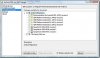
- You should now install the platform tools and at least one platform image. You can use API 8 or above. It is recommended to use API 8.
You can also install Google USB Driver if you need to connect a real device with USB.


Note that you can install more packages later.

- Press on Install Selected and install both packages.

Install and configure Basic4android

- Download and install Basic4android.
- Open Basic4android.
- Choose Tools menu - Configure Paths.


- Use the browse buttons to locate "javac.exe" and "android.jar"
javac is located under <java folder>\bin.
android.jar is located under <android-sdk-windows>\platforms\android-8

On Windows 64 bit, Java will probably be installed under C:\Program Files (x86).

Follow the second tutorial for the emulator setup and a Hello World application.

Common errors
- Windows XP - "Basic4Android.exe Application could not be initialised correctly error 0xc0000135" on startup. Basic4android requires .Net Framework 2.0 or above. Windows XP users who didn't install it before should first install the framework.

- "javac: target release 1.5 conflicts with default source release 1.7" - Currently Basic4android requires Java 6. It will not work with Java 7. Both versions can be installed on the same computer.
Reply With Quote
  #2 (permalink)  
Old 11-02-2010, 06:05 PM
Newbie
 
Join Date: Oct 2007
Posts: 7
Default

Good news . Where can i download Basic4Android ?

Thanks
Reply With Quote
  #3 (permalink)  
Old 11-02-2010, 06:19 PM
Erel's Avatar
Administrator
 
Join Date: Apr 2007
Posts: 15,689
Awards Showcase
Basic4ppc Founder 
Total Awards: 1
Default

Quote:
Where can i download Basic4Android ?
Basic4android is not ready yet...
The first beta should be released to the beta testers in a few days.
I believe that the first version will be released at the beginning of December.


Edit, Here: www.basic4ppc.com/android/downloads.html
Reply With Quote
  #4 (permalink)  
Old 11-02-2010, 06:54 PM
Newbie
 
Join Date: Oct 2007
Posts: 7
Default

Thanks.


Quote:
Originally Posted by Erel View Post
Basic4android is not ready yet...
The first beta should be released to the beta testers in a few days.
I believe that the first version will be released at the beginning of December.
Reply With Quote
  #5 (permalink)  
Old 11-02-2010, 09:26 PM
derez's Avatar
Basic4ppc Expert
 
Join Date: May 2007
Posts: 978
Awards Showcase
Beta Tester Competition Winner 
Total Awards: 2
Default

Great news !

Erel - the last Java SE is kit6u22, will it be a problem if I use this version ?
__________________
David Erez
Ramat Hasharon, Israel
Reply With Quote
  #6 (permalink)  
Old 11-03-2010, 04:58 AM
Erel's Avatar
Administrator
 
Join Date: Apr 2007
Posts: 15,689
Awards Showcase
Basic4ppc Founder 
Total Awards: 1
Default

No. Any version of Java 6 JDK should work.
Reply With Quote
  #7 (permalink)  
Old 11-05-2010, 11:27 PM
eclipse_wolfgang's Avatar
Newbie
 
Join Date: May 2007
Location: Germany
Posts: 8
Default

Quote:
Originally Posted by Erel View Post
...The first step should be to install the Java JDK as Android SDK requires it as well.
...
Is the JDK still necessary, if i have alread installed eclipse and the Android SDK on my computer?

Best regards
Wolfgang
Reply With Quote
  #8 (permalink)  
Old 11-06-2010, 07:51 AM
Erel's Avatar
Administrator
 
Join Date: Apr 2007
Posts: 15,689
Awards Showcase
Basic4ppc Founder 
Total Awards: 1
Default

Quote:
Is the JDK still necessary, if i have alread installed eclipse and the Android SDK on my computer?
You need to have javac.exe which is the java compiler. I believe that Eclipse comes with its own compiler which you will not be able to use with Basic4android.
Reply With Quote
  #9 (permalink)  
Old 11-25-2010, 03:50 PM
Junior Member
 
Join Date: Jan 2009
Posts: 21
Exclamation

Quote:
Originally Posted by Erel View Post
Install and configure Basic4android

- Download and install Basic4android.
- Open Basic4android.
- Choose Tools menu - Configure Paths.
I could not find where to download for Basic4android

I have successfully installed the Java JDK and Android SDK.And I waiting for Basic4android...
Reply With Quote
  #10 (permalink)  
Old 01-16-2011, 02:38 AM
Basic4ppc Expert
 
Join Date: May 2008
Posts: 550
Default

How to build app for Android 1.5?
__________________
I'm not good at English, please understand. Thank you.
Reply With Quote
Reply


Currently Active Users Viewing This Thread: 5 (0 members and 5 guests)
 
Thread Tools
Display Modes

Posting Rules
You may not post new threads
You may not post replies
You may not post attachments
You may not edit your posts

vB code is On
Smilies are On
[IMG] code is On
HTML code is Off
Trackbacks are Off
Pingbacks are Off
Refbacks are On

Similar Threads
Thread Thread Starter Forum Replies Last Post
Basic4android - do you want to help? Erel Basic4android Updates and Questions 4 10-21-2010 02:37 PM
Basic4Android Reference Guide Cableguy Basic4android Updates and Questions 1 10-21-2010 02:13 PM
Transform apps from basic4ppc to basic4android schimanski Basic4android Updates and Questions 2 10-21-2010 12:44 PM
Basic4android timeline Erel Basic4android Updates and Questions 0 10-08-2010 04:30 PM
Installing into PPC mj19bg63 Questions (Windows Mobile) 2 05-18-2009 05:02 PM


All times are GMT. The time now is 10:11 AM.


Powered by vBulletin® Version 3.6.12
Copyright ©2000 - 2012, Jelsoft Enterprises Ltd.
Search Engine Friendly URLs by vBSEO 3.3.0