Download the free trial version
Basic4android Video
Features
Tutorials and manuals
Showcase
Screenshots

Go Back   Android Development Forum - Basic4android > Basic4android > Basic4android Getting started & Tutorials
Documentation Wiki Register Members List B4P Search Today's Posts Mark Forums Read

Basic4android Getting started & Tutorials Android development starts here. Please do not post questions in this sub-forum.

GPS tutorial

Reply
 
LinkBack Thread Tools Display Modes
  #1 (permalink)  
Old 11-14-2010, 04:02 PM
Erel's Avatar
Administrator
 
Join Date: Apr 2007
Posts: 15,689
Awards Showcase
Basic4ppc Founder 
Total Awards: 1
Default GPS tutorial

The GPS is an important feature of many Android devices.
Fortunately it is pretty easy to work with it.
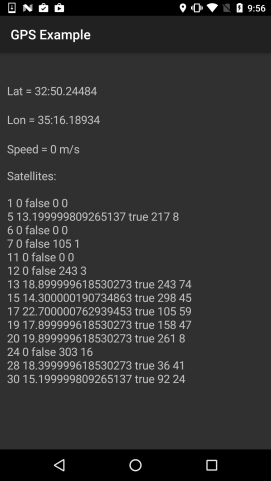
In this tutorial we will cover a simple program that shows the current position as well as the satellites status.


The GPS functionality is packaged in the GPS library.
Therefore we should first add a reference to this library:


There are three types of relevant objects. The main one is GPS.
The GPS manages the connection and events. The second is Location.
A Location is a structure that holds the data available regarding a specific "fix". The data includes the latitude and longitude coordinates, the time (expressed as ticks) of this fix and other information like bearing, altitude and so on.
It may happen that not all information is available (due to poor reception for example).

The Location also includes other functionalities like calculating the distance and bearing to another location and methods to convert the coordinates string formats.
Usually you will work with Location objects passed to you in the LocationChanged events. However you can also initialize such objects yourself (this is useful for calculating distance and bearing between locations).

The last one is GPSSatellite. This is a structure that holds various information regarding the currently known satellites. It is passed to you in GPSStatus event.

Back to GPS.
The GPS object should be declared as a Process_Global object. Otherwise new instances will be created each time the activity is recreated.

The first step is to initialize the object. Like many other Initialize methods this one expects an EventName parameter. This is the prefix for the events that will be raised by the GPS object.

Here is the complete code:
Code:
Sub Process_Globals
    
Dim GPS1 As GPS
End Sub

Sub Globals
    
Dim lblLon As Label
    
Dim lblLat As Label
    
Dim lblSpeed As Label
    
Dim lblSatellites As Label
End Sub

Sub Activity_Create(FirstTime As Boolean)
    
If FirstTime Then
        GPS1.Initialize(
"GPS")
    
End If
    Activity.LoadLayout(
"1")
End Sub

Sub Activity_Resume
    
If GPS1.GPSEnabled = False Then
        
ToastMessageShow("Please enable the GPS device."True)
        
StartActivity(GPS1.LocationSettingsIntent) 'Will open the relevant settings screen.
    Else
        GPS1.Start(
00'Listen to GPS with no filters.
    End If
End Sub

Sub Activity_Pause (UserClosed As Boolean)
    GPS1.Stop
End Sub

Sub GPS_LocationChanged (Location1 As Location)
    lblLat.Text = 
"Lat = " & Location1.ConvertToMinutes(Location1.Latitude)
    lblLon.Text = 
"Lon = " & Location1.ConvertToMinutes(Location1.Longitude)
    lblSpeed.Text = 
"Speed = " & Location1.Speed
End Sub

Sub GPS_UserEnabled (Enabled As Boolean)
    
ToastMessageShow("GPS device enabled = " & Enabled, True)
End Sub

Sub GPS_GpsStatus (Satellites As List)
    lblSatellites.Text = 
"Satellites:" & CRLF
    
For i = 0 To Satellites.Size - 1
        
Dim Satellite As GPSSatellite
        Satellite = Satellites.Get(i)
        lblSatellites.Text = lblSatellites.Text & 
CRLF & Satellite.Prn & _
            
" " & Satellite.Snr & " " & Satellite.UsedInFix & " " & Satellite.Azimuth _ 
            & 
" " & Satellite.Elevation
    
Next
End Sub
The next step is to tell the GPS to start listening for data. The GPS can consume quite a lot of battery. Therefore it is recommended to stop using the GPS whenever it is not necessary. It is recommended to start listening in Activity_Resume and stop listening in Activity_Pause.

It may happen that the user has turned off the GPS. Due to privacy concerns the Android OS doesn't allow you to turn the GPS on programatically. The best thing that you can do is to ask the user to enable the GPS device.

The following code shows a message if the GPS is not enabled and also opens the GPS control panel so the user only needs to check the GPS option:
Code:
Sub Activity_Resume
    
If GPS1.GPSEnabled = False Then
        
ToastMessageShow("Please enable the GPS device."True)
        
StartActivity(GPS1.LocationSettingsIntent) 'Will open the relevant settings screen.
    Else
        GPS1.Start(
00'Listen to GPS with no filters.
    End If
End Sub
If the GPS is enabled we are starting to listen for data. The Start method receives two values which are the minimum time (milliseconds) and the minimum distance (meters) between events. An event will be raised when at least one of these criterions is met. This can help saving battery.
In our case we are passing 0 and therefore will get all fix events.

The GPS raises three events:
- GPS_LocationChanged (Location1 As Location)
This is the main event. Location1 holds the data for the new fix.

-GPS_GpsStatus (Satellites As List)
This event allows you to display information about the currently available satellites. Note that not all satellites in the list are actually used for calculating the last fix. So it is possible that the list will include several satellites but still the reception is not good enough for a fix.

- GPS_UserEnabled (Enabled As Boolean)
This event is raised whenever the user changes the status of the GPS device. It is also raised right after calling Start.

The program is attached.
Attached Files
File Type: zip GPS.zip (6.3 KB, 778 views)
Reply With Quote
  #2 (permalink)  
Old 12-02-2010, 10:32 AM
schimanski's Avatar
Basic4ppc Veteran
 
Join Date: Oct 2007
Location: Germany
Posts: 289
Default Result of bearingto is negativ

Hello!

I have calculate the bearing from my own position to the target-position with

Code:
Kurs=GPS1.BearingTo(Target)
The result of Kurs is negativ and not equal with the real bearing.
__________________
schimanski
--------------------------------------
Device: Motorola Defy, Samsung Galaxy Tab P1000
Dekstop: Asus Eee PC
Reply With Quote
  #3 (permalink)  
Old 12-02-2010, 12:45 PM
Erel's Avatar
Administrator
 
Join Date: Apr 2007
Posts: 15,689
Awards Showcase
Basic4ppc Founder 
Total Awards: 1
Default

GPS1 is a location object? How did you initialize the Target?
Can you post the values of GPS1, Target and Kurs.
Code:
Log(GPS1)
Log(Target)
Log(Kurs)
Reply With Quote
  #4 (permalink)  
Old 12-02-2010, 02:55 PM
schimanski's Avatar
Basic4ppc Veteran
 
Join Date: Oct 2007
Location: Germany
Posts: 289
Default

Hello Erel!

Is it possible, that the bearing is not shown in 0-360°? When it is shown from 0-180 and -180 to 0°, I think it is correct...
__________________
schimanski
--------------------------------------
Device: Motorola Defy, Samsung Galaxy Tab P1000
Dekstop: Asus Eee PC
Reply With Quote
  #5 (permalink)  
Old 12-02-2010, 03:05 PM
Erel's Avatar
Administrator
 
Join Date: Apr 2007
Posts: 15,689
Awards Showcase
Basic4ppc Founder 
Total Awards: 1
Default

This is probably the case here.
Reply With Quote
  #6 (permalink)  
Old 12-17-2010, 05:23 PM
Basic4ppc Veteran
 
Join Date: Feb 2008
Posts: 274
Default

So, isn't possible programmatical on\off (connect\disconnect) of Android's GPS subsystem (like in WM 5.x-6.x)? Without manual user's choice.
I mean periodical GPS auto-connect by a software only.
__________________
LG P500, Android v.2.3
Reply With Quote
  #7 (permalink)  
Old 12-17-2010, 05:48 PM
agraham's Avatar
Basic4ppc Expert
 
Join Date: Jul 2007
Location: Cheshire, UK
Posts: 6,072
Awards Showcase
Innovator medal Beta Tester Forum Contributer 
Total Awards: 3
Default

Quote:
Originally Posted by peacemaker View Post
So, isn't possible programmatical on\off (connect\disconnect) of Android's GPS subsystem (like in WM 5.x-6.x)? Without manual user's choice.
No, it's not possible. As Erel stated above.
Quote:
Due to privacy concerns the Android OS doesn't allow you to turn the GPS on programatically.
__________________
Sorry, but I don't answer questions by PM or email.
Please post your queries in the forum.
Reply With Quote
  #8 (permalink)  
Old 12-19-2010, 06:06 AM
Erel's Avatar
Administrator
 
Join Date: Apr 2007
Posts: 15,689
Awards Showcase
Basic4ppc Founder 
Total Awards: 1
Default

You can't enable or disable the GPS device. However if it is enabled it will turn on when it needed and off when it is not needed (to save battery).
Reply With Quote
  #9 (permalink)  
Old 12-19-2010, 10:29 AM
Basic4ppc Veteran
 
Join Date: Feb 2008
Posts: 274
Default

Ha, so this is enough. Just an extra manual permission from a user, i see.
Thanks, Erel.
Now just interesting about background running application and switching the screen off, again for battery economy.
__________________
LG P500, Android v.2.3

Last edited by peacemaker : 12-19-2010 at 10:31 AM.
Reply With Quote
  #10 (permalink)  
Old 12-22-2010, 05:20 PM
ZJP's Avatar
ZJP ZJP is offline
Senior Member
 
Join Date: Dec 2010
Posts: 136
Default

Hi,

Good work but what about the NMEA ? ( hxxp://developer.android.com/reference/android/location/GpsStatus.NmeaListener.html )
How to get those frames?

Thx

Last edited by ZJP : 12-22-2010 at 05:23 PM.
Reply With Quote
Reply


Currently Active Users Viewing This Thread: 1 (0 members and 1 guests)
 
Thread Tools
Display Modes

Posting Rules
You may not post new threads
You may not post replies
You may not post attachments
You may not edit your posts

vB code is On
Smilies are On
[IMG] code is On
HTML code is Off
Trackbacks are Off
Pingbacks are Off
Refbacks are On

Similar Threads
Thread Thread Starter Forum Replies Last Post
MediaPlayer tutorial Erel Basic4android Getting started & Tutorials 27 05-20-2012 08:52 AM
ListView tutorial Erel Basic4android Getting started & Tutorials 55 05-17-2012 09:58 PM
SQL Tutorial Erel Tutorials 32 02-07-2011 09:14 AM
New graphics tutorial Erel Announcements 1 12-11-2009 02:56 PM
New GPS tutorial Erel Announcements 2 11-05-2007 11:39 AM


All times are GMT. The time now is 10:17 AM.


Powered by vBulletin® Version 3.6.12
Copyright ©2000 - 2012, Jelsoft Enterprises Ltd.
Search Engine Friendly URLs by vBSEO 3.3.0