
A new more powerful framework is now available: jRDC2.
This tutorial explains the basic concepts required for creating a connection between Android device and a remote server. In this case it is a MySQL database.
A tutorial for connecting to SQL Server is available here.
Android cannot connect directly to the database server (search for JdbcSQL). Therefore we need to create a simple web service that will pass the requests to the database and will return the response.
For this example I've created a new database that lists the countries population. The data was derived from a UN database.
The database includes a single table named "countries" with three columns:

PHP Script
The web service is made of a single PHP script running on the same server.
You have several options for the web service implementation. You can create several prepared statements which will be filled with parameters passed in the request.
Or you can take the complete query from the request and pass it to the database server.
There are high security risks with issuing queries received from an unknown user. If your service is public then you will probably want to choose the first option.
You should also make sure to correctly escape the parameters. See this php method: PHP: mysql_real_escape_string - Manual
In our example I've chosen the second option which takes the query and passes it to the database directly.
I've restricted the database user to SELECT queries (in MySQL configuration).
The PHP code:
The script takes the query from the POST data and submits it to the database.
The result is then written in JSON format.
B4A code
Our application displays a list of countries. When the user presses on a country, its population is retrieved from the database and displayed.
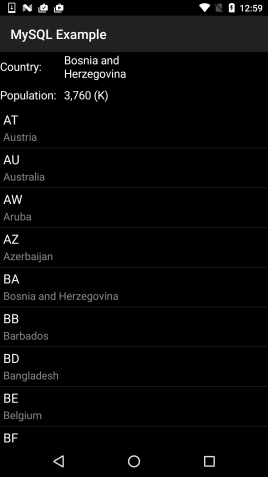
The code sends the query and then when the result arrives the JSON is parsed and displayed.
Note that in this case the JSON object is made of an array of one or more maps.
Edit: Code updated to use OkHttpUtils2.
This tutorial explains the basic concepts required for creating a connection between Android device and a remote server. In this case it is a MySQL database.
A tutorial for connecting to SQL Server is available here.
For this example I've created a new database that lists the countries population. The data was derived from a UN database.
The database includes a single table named "countries" with three columns:
PHP Script
The web service is made of a single PHP script running on the same server.
You have several options for the web service implementation. You can create several prepared statements which will be filled with parameters passed in the request.
Or you can take the complete query from the request and pass it to the database server.
There are high security risks with issuing queries received from an unknown user. If your service is public then you will probably want to choose the first option.
You should also make sure to correctly escape the parameters. See this php method: PHP: mysql_real_escape_string - Manual
In our example I've chosen the second option which takes the query and passes it to the database directly.
I've restricted the database user to SELECT queries (in MySQL configuration).
The PHP code:
PHP:
<?php

$databasehost = "localhost";
$databasename = "xxxx";
$databaseusername ="xxxx";
$databasepassword = "xxxx";

$con = mysqli_connect($databasehost,$databaseusername,$databasepassword, $databasename) or die(mysqli_error($con));
mysqli_set_charset ($con , "utf8");
$query = file_get_contents("php://input");
$sth = mysqli_query($con, $query);

if (mysqli_errno($con)) {
   header("HTTP/1.1 500 Internal Server Error");
   echo $query.'\n';
   echo mysqli_error($con);
}
else
{
   $rows = array();
   while($r = mysqli_fetch_assoc($sth)) {
     $rows[] = $r;
   }
   $res = json_encode($rows);
    echo $res;
    mysqli_free_result($sth);
}
mysqli_close($con);
?>
The result is then written in JSON format.
B4A code
Our application displays a list of countries. When the user presses on a country, its population is retrieved from the database and displayed.
The code sends the query and then when the result arrives the JSON is parsed and displayed.
Note that in this case the JSON object is made of an array of one or more maps.
Edit: Code updated to use OkHttpUtils2.
Attachments
Last edited:


