
Do not use this program it is a very old one which was released before the GoogleMaps library was released.
Many things have changed since the release of this program and it does no more work as expected.
I have not updated it to satisfy the new requirements of Google which have become more and more restrictive.
Here is a GPS Example program with following functions:
The program needs following additional libraries:
- ByteConverter
- Dialogs
- RandomAccessFile
- WebViewExtras
- ScrollView2D
Thank's to warwound for the WebViewExtras library, that allowed adding events to the GoogleMaps WebView.
The programs functionalities are explained in the Basic4Android User's Guide and some code is also explained.
If there are some code parts you would like having explained in the Basic4Android User's Guide post the request in this thread.
Best regards.
EDIT: 2011.12.20 version 1.1
Updated the source code after the bug reports.
EDIT: 2011.12.21 version 1.2
Added the maptype_changed event, problem reported by dlfallen in post#21
EDIT: 2011.12.22 version 1.3
Changed the zoom calculation
Added MapTypeControlID choice
Added MapZoomControlStyle choice
EDIT: 2011.12.23 version 1.4
Amended the problems reported by dlfallen
EDIT: 2011.12.27 version 1.5
Added saving of a GPS path in Google Earth KML format.
Removed the short help file, the help is in the Beginner's Guide.
EDIT: 2011.12.28 version 1.51
Amended bug reported by timo in post #37
EDIT: 2012.02.06 version 1.55
Amended bug report by msains in post #56
EDIT: 2012.02.06 version 1.56
Amended bug report by alfcen in post #59
EDIT: 2012.02.08 version 1.60
Amended bug report by Andras in post #64
EDIT: 2012.06.02 version 1.70
Added most of Barry Sumpters' wishes
Amended input from Filippo (German forum)
Added an InfoWindow for the first marker, when clicking on the first Marker an InfoWindoe is displayed.
EDIT: 2012.06.12 version 1.80
Added a filter to remove close locations.
Improved some function and removed some bugs.
EDIT: 2012.10.09 version 2.00
Updated for tablets.
Works only in portrait on phones and both orientations on tablets.
Needs Basic4Android version 2.2 (uses AutoScale)
EDIT: 2013.03.06 version 2.1
Amended error reported in post #142.
EDIT: 2014.08.09 version 2.2
Added altitude above sea level post #175
EDIT: 2015.04.17 version 2.3
Amended error reported in post #179
Amended some minor bugs
EDIT 2018.02.15 version 2.6
Removed DoEvents
Replaced File.DirRootExternal by GetSafeDirDefaultExternal.
Many things have changed since the release of this program and it does no more work as expected.
I have not updated it to satisfy the new requirements of Google which have become more and more restrictive.
Here is a GPS Example program with following functions:
- Connect the GPS
- Get and display GPS information
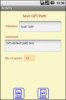
- Save a GPS path (program internal GPP format and Google Earth KML format)
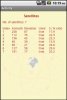
- Display the available satellites
- Display Google maps
- Display a GPS path on the map
- Shows current GPS position on the map
- Display zoom control
- Display scale control
- Display a path
- Display markers
- Move a marker
- Display coordinates (touch the screen)
- Move the map / Display coordinates (touch the screen and move)
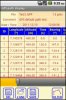
- Table with first column always visible. Image GPS_3.
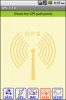
- Touching a button changes it's color and shows a tooltip on top of the screen. Releasing it insides the button area executes the function and hides the tooltip. Releasing outsides the butoon area does not execute the function and hides the tooltip. This allows to check a button function without executing it. Image GPS_4
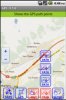
- Touching some buttons displays 'subbuttons' to select other setup parameters more easily rather than doing it in the setup screen. Image GPS_5
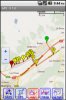
- GPS_1 Display of a GPS path with polyline and markers
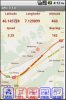
- GPS_2 Display of current GPS data with the position on the map
- GPS_3 Display of GPS path data in a table
- GPS_4 Main screen, display of a tooltip, just touched the PATH button before releasing it
- GPS_5 Display of 'subbuttons' to select setup parameters
- GPS_6 Display og Satellites data
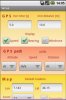
- GPS_7 Setup screen
- GPS_8 Save screen with one button foe each file format
- GPS_9 Shows InfoWindow
The program needs following additional libraries:
- ByteConverter
- Dialogs
- RandomAccessFile
- WebViewExtras
- ScrollView2D
Thank's to warwound for the WebViewExtras library, that allowed adding events to the GoogleMaps WebView.
The programs functionalities are explained in the Basic4Android User's Guide and some code is also explained.
If there are some code parts you would like having explained in the Basic4Android User's Guide post the request in this thread.
Best regards.
EDIT: 2011.12.20 version 1.1
Updated the source code after the bug reports.
EDIT: 2011.12.21 version 1.2
Added the maptype_changed event, problem reported by dlfallen in post#21
EDIT: 2011.12.22 version 1.3
Changed the zoom calculation
Added MapTypeControlID choice
Added MapZoomControlStyle choice
EDIT: 2011.12.23 version 1.4
Amended the problems reported by dlfallen
EDIT: 2011.12.27 version 1.5
Added saving of a GPS path in Google Earth KML format.
Removed the short help file, the help is in the Beginner's Guide.
EDIT: 2011.12.28 version 1.51
Amended bug reported by timo in post #37
EDIT: 2012.02.06 version 1.55
Amended bug report by msains in post #56
EDIT: 2012.02.06 version 1.56
Amended bug report by alfcen in post #59
EDIT: 2012.02.08 version 1.60
Amended bug report by Andras in post #64
EDIT: 2012.06.02 version 1.70
Added most of Barry Sumpters' wishes
Amended input from Filippo (German forum)
Added an InfoWindow for the first marker, when clicking on the first Marker an InfoWindoe is displayed.
EDIT: 2012.06.12 version 1.80
Added a filter to remove close locations.
Improved some function and removed some bugs.
EDIT: 2012.10.09 version 2.00
Updated for tablets.
Works only in portrait on phones and both orientations on tablets.
Needs Basic4Android version 2.2 (uses AutoScale)
EDIT: 2013.03.06 version 2.1
Amended error reported in post #142.
EDIT: 2014.08.09 version 2.2
Added altitude above sea level post #175
EDIT: 2015.04.17 version 2.3
Amended error reported in post #179
Amended some minor bugs
EDIT 2018.02.15 version 2.6
Removed DoEvents
Replaced File.DirRootExternal by GetSafeDirDefaultExternal.
Attachments
-
 GPS_1.jpg62.1 KB · Views: 48,780
 -
 GPS_2.jpg61.6 KB · Views: 4,377
 -
 GPS_3.jpg74.8 KB · Views: 48,621
 -
 GPS_4.jpg46.7 KB · Views: 3,841
 -
 GPS_5.jpg66.1 KB · Views: 3,912
 -
 GPS_6.jpg33.9 KB · Views: 3,714
 -
 GPS_7.jpg42.3 KB · Views: 3,949
 -
 GPS_8.jpg33.1 KB · Views: 3,556
 -
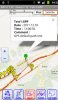 GPS_9.jpg52.8 KB · Views: 3,832
 -
GPSExampleV2_6.zip134.5 KB · Views: 2,053
Last edited:


 )
) 


