
Download the free trial version
Basic4android Video
Features
Tutorials and manuals
Showcase
Screenshots

Go Back   Android Development Forum - Basic4android > Basic4ppc (Windows Mobile) > Code Samples & Tips > Official Updates
Documentation Wiki Register Members List B4P Search Today's Posts Mark Forums Read

Official Updates Updates to official libraries could be found here.
This forum is only available to licensed users.

Hardware v3.55 - ShowNumericSIP function

Reply
 
LinkBack Thread Tools Display Modes
  #1 (permalink)  
Old 08-16-2009, 07:23 PM
Erel's Avatar
Administrator
 
Join Date: Apr 2007
Posts: 13,162
Awards Showcase
Basic4ppc Founder 
Total Awards: 1
Default Hardware v3.55 - ShowNumericSIP function

A new method named ShowNumericSIP was added to the hardware library.
Calling this method will show the soft input panel in numeric mode.
To return to the default mode you should call ShowDefaultSIP.
This code is based on Alex Feinman code: Switching Input Panel into numeric mode - OpenNETCF Community

Setup instructions:
- Download hardware.zip.
- Extract and copy all files to Basic4ppc libraries folder. Default is:
c:\Program Files\Anywhere Software\Basic4ppc Desktop\Libraries

An example is also attached.
Attached Files
File Type: zip hardware.zip (42.4 KB, 334 views)
File Type: sbp ShowNumericSip.sbp (760 Bytes, 173 views)
__________________
Basic4android documentation
Reply With Quote
  #2 (permalink)  
Old 08-30-2009, 06:46 PM
JJM JJM is offline
Senior Member
 
Join Date: Apr 2007
Location: France
Posts: 123
Default Hardware v3.55 - ShowNumericSIP function

Hello,

I tried to compile this example:
'**********
Sub Globals
'Declare the global variables here.

End Sub

Sub App_Start
Form1.Show
hardware.New1
End Sub


Sub Button1_Click
hardware.ShowNumericSIP
End Sub

Sub Button2_Click
hardware.ShowDefaultSIP
End Sub
'*********
I have Extracted and copied all files to Basic4ppc libraries folder(
c:\Program Files\Anywhere Software\Basic4ppc Desktop\Libraries)
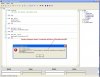
When I wanted to compile the program i got an error (as shown on the screencopy.jpg).

Please could you help me?

Thanks

JJM
Attached Images
File Type: jpg Screencopy.jpg (87.1 KB, 65 views)
Reply With Quote
  #3 (permalink)  
Old 08-30-2009, 07:58 PM
Erel's Avatar
Administrator
 
Join Date: Apr 2007
Posts: 13,162
Awards Showcase
Basic4ppc Founder 
Total Awards: 1
Default

Are you using Basic4ppc v6.80? If not then you need to manually replace the old HardwareDesktop.dll and Hardware.dll which are located in your source code folder.
__________________
Basic4android documentation
Reply With Quote
  #4 (permalink)  
Old 08-30-2009, 09:53 PM
JJM JJM is offline
Senior Member
 
Join Date: Apr 2007
Location: France
Posts: 123
Default

Hello,
Yes! I use it.

Bye

JJ M
Reply With Quote
  #5 (permalink)  
Old 08-31-2009, 07:20 PM
Erel's Avatar
Administrator
 
Join Date: Apr 2007
Posts: 13,162
Awards Showcase
Basic4ppc Founder 
Total Awards: 1
Default

It seems that the old hardware.cs is used instead of the new one.
This file is located in the libraries folder.
You can open it with a text editor and check the first line. It should be //version:3.55.
__________________
Basic4android documentation
Reply With Quote
  #6 (permalink)  
Old 09-04-2009, 08:48 PM
JJM JJM is offline
Senior Member
 
Join Date: Apr 2007
Location: France
Posts: 123
Default Shownumeric

Hello Erel,

It's true. The version of the cs file was 3.5.
With the new one (3.55) it wasn't any error during the compilation.
Thank you.
JJ M
Reply With Quote
  #7 (permalink)  
Old 09-06-2009, 07:03 AM
tremara1's Avatar
Senior Member
 
Join Date: Oct 2008
Location: Ballarat Victoria Australia
Posts: 161
Default ShowSipNumeric not happening

The hardware dll's from this thread does not seem to work with the show sip numeric method, am I missing something?. I am using b4ppc 6.80. The sample compiled ok but threw an error when run on the device.
thanks....Trevor
Ballarat Victoria Australia
Reply With Quote
  #8 (permalink)  
Old 09-06-2009, 07:14 PM
Erel's Avatar
Administrator
 
Join Date: Apr 2007
Posts: 13,162
Awards Showcase
Basic4ppc Founder 
Total Awards: 1
Default

Which error did it throw?
__________________
Basic4android documentation
Reply With Quote
  #9 (permalink)  
Old 09-06-2009, 10:58 PM
tremara1's Avatar
Senior Member
 
Join Date: Oct 2008
Location: Ballarat Victoria Australia
Posts: 161
Default hardware error

Main.button1_click Error description: Invalid property.
When this example is open in b4ppc the showNumericSip method does not appear in autocomplete. The version of the dll is 1.0.3515.36372.
Trevor
Ballarat Victoria Australia
Reply With Quote
  #10 (permalink)  
Old 09-07-2009, 07:23 PM
Erel's Avatar
Administrator
 
Join Date: Apr 2007
Posts: 13,162
Awards Showcase
Basic4ppc Founder 
Total Awards: 1
Default

You can check the version by writing:
Code:
Hardware1.New 'Make sure to add a Hardware object with this name
Msgbox(Hardware1.DLLVersion)
It should show 3.55. I guess that you still have the old dll on the device.
__________________
Basic4android documentation
Reply With Quote
Reply


Currently Active Users Viewing This Thread: 1 (0 members and 1 guests)
 
Thread Tools
Display Modes

Posting Rules
You may not post new threads
You may not post replies
You may not post attachments
You may not edit your posts

vB code is On
Smilies are On
[IMG] code is On
HTML code is Off
Trackbacks are Off
Pingbacks are Off
Refbacks are On

Similar Threads
Thread Thread Starter Forum Replies Last Post
Function Key eillezcas Questions (Windows Mobile) 0 08-27-2008 09:28 PM
Exp() function Bruno Questions (Windows Mobile) 5 06-05-2008 08:03 PM
set focus function gjoisa Questions (Windows Mobile) 3 05-13-2008 05:53 PM
Hardware.DLL Bobbes German Forum 9 11-18-2007 04:17 PM
About Hardware.dll JJM Questions (Windows Mobile) 4 07-10-2007 09:57 PM


All times are GMT. The time now is 04:48 AM.


Powered by vBulletin® Version 3.6.12
Copyright ©2000 - 2012, Jelsoft Enterprises Ltd.
Search Engine Friendly URLs by vBSEO 3.3.0