Basic4ppc - Windows Mobile Development  

Go Back   Basic4ppc - Windows Mobile Development > Main Category > Open Source Projects
Home Register FAQ Members List Search Today's Posts Mark Forums Read

Open Source Projects The place to discuss Basic4ppc open source applications.


Pocket Weather


Reply
 
LinkBack (2) Thread Tools Display Modes
  #11 (permalink)  
Old 11-15-2008, 02:09 PM
klaus's Avatar
Basic4ppc Expert
 
Join Date: Oct 2007
Location: Switzerland
Posts: 1,577
Awards Showcase
Forum Contributer Beta Tester Competition Winner 
Total Awards: 3
Default

Hi digitaldon37,
I had a look at your program, very nice and interesting.

One suggestion would be to insert somewhere the link to
Yahoo! Weather
where the user can find its location(s) from all around the world.

I tried some locations from Europe, works fine.

In your code you should add a test if
WeatherCurrent.code = 3200
3200 is the unknown code, this code is sometimes given for certain locations.
And in this case, in the Sub SetMainPage routine, line
imgCurrent.Image=AppPath & "\themes\" & INI.themeDir & "\conditions\" & WeatherConditionImages(WeatherCurrent.code)
generates an error.

There does also exist a condition code 0 (tornado), you shoud add an image 0.jpg for this code.

The images in your last version look nicer to me than those from the nws.
Didn't you have a link for their images in your first post ?

Best regards.

__________________
Klaus
Switzerland
Reply With Quote
  #12 (permalink)  
Old 11-15-2008, 04:22 PM
Basic4ppc Veteran
 
Join Date: Jan 2008
Posts: 210
Default

Quote:
Originally Posted by klaus View Post
Hi digitaldon37,
I had a look at your program, very nice and interesting.

One suggestion would be to insert somewhere the link to
Yahoo! Weather
where the user can find its location(s) from all around the world.

I tried some locations from Europe, works fine.

In your code you should add a test if
WeatherCurrent.code = 3200
3200 is the unknown code, this code is sometimes given for certain locations.
And in this case, in the Sub SetMainPage routine, line
imgCurrent.Image=AppPath & "\themes\" & INI.themeDir & "\conditions\" & WeatherConditionImages(WeatherCurrent.code)
generates an error.

There does also exist a condition code 0 (tornado), you shoud add an image 0.jpg for this code.

The images in your last version look nicer to me than those from the nws.
Didn't you have a link for their images in your first post ?

Best regards.

Hi Klaus - thanks for the feedback and finding the bugs - I'll get those added to the next release.

I haven't decided exactly how to let the user find their location id yet. I am thinking of added a new program form with agraham's webbrowser library and inserting the Yahoo page (there doesn't seem to be a web service available) and to capture the result.

The original icons (before I grabbed the Yahoo icons) I think I got from here: Weathericons - Weatherstation Salo, Halikko, FI. I was going to go back and put together a post on how to change the theme and weather icons.
Reply With Quote
  #13 (permalink)  
Old 11-15-2008, 06:02 PM
klaus's Avatar
Basic4ppc Expert
 
Join Date: Oct 2007
Location: Switzerland
Posts: 1,577
Awards Showcase
Forum Contributer Beta Tester Competition Winner 
Total Awards: 3
Default

Hi ,

From what I remeber, when I loaded your program the first time there were no icons. And there was this link
Weather Element List and Suggested Icons - NOAA's National Weather Service
to download the images.

The link in your post doesn't work.

In googeling I found thos one
Weatherstation Salo, Halikko - Weatherstation Salo, Halikko, FI
and then click on Weathericons

Best regards.
__________________
Klaus
Switzerland
Reply With Quote
  #14 (permalink)  
Old 11-17-2008, 10:23 AM
klaus's Avatar
Basic4ppc Expert
 
Join Date: Oct 2007
Location: Switzerland
Posts: 1,577
Awards Showcase
Forum Contributer Beta Tester Competition Winner 
Total Awards: 3
Default

Hi digitaldon37,

I wanted to learn a bit more in retrieving web information, so I took your program as a first sample.

As once suggested, I took the liberty to add a location search to your program.
I didn't make any cosmetics.

If you are interested in you can for shure use it.

I post only the sbp file.

Best regards.
Attached Files
File Type: sbp Weather.sbp (33.6 KB, 22 views)
__________________
Klaus
Switzerland

Last edited by klaus : 11-17-2008 at 11:12 AM.
Reply With Quote
  #15 (permalink)  
Old 11-17-2008, 02:30 PM
Basic4ppc Veteran
 
Join Date: Jan 2008
Posts: 210
Default

Quote:
Originally Posted by klaus View Post
Hi digitaldon37,

I wanted to learn a bit more in retrieving web information, so I took your program as a first sample.

As once suggested, I took the liberty to add a location search to your program.
I didn't make any cosmetics.

If you are interested in you can for shure use it.

I post only the sbp file.

Best regards.
This is great! I will add it to the next developer release. Thanks Klaus!
Reply With Quote
  #16 (permalink)  
Old 11-17-2008, 09:21 PM
Basic4ppc Veteran
 
Join Date: Jan 2008
Posts: 210
Default version .25

Developer's version .25 has been uploaded to the main post. This version contains the location look-up code that Klaus generously provided.

I am going to try to wait at least a week before adding any new enhancements. This will give me enough time to test this thoroughly. Thanks to everyone for their help and feedback.
Reply With Quote
  #17 (permalink)  
Old 11-18-2008, 06:17 AM
klaus's Avatar
Basic4ppc Expert
 
Join Date: Oct 2007
Location: Switzerland
Posts: 1,577
Awards Showcase
Forum Contributer Beta Tester Competition Winner 
Total Awards: 3
Default

Hi digitaldon37,

In the location search part of the program you should change one line.
Code:

Sub cbxCountry_SelectionChanged (Index, Value)
Dim txt
 
  cbxCity.Visible=True
  RegionI=Index
  txt="http://weather.yahoo.com/"&AL2.Item(Index)
  WebRequest(txt)
  BrowseSubRegional
  If cbxCity.Count > 20 AND StrAt(cbxCity.Item(0),0) = StrAt(cbxCity.Item(cbxCity.Count-1),0) Then
    cbxAlphabet.Visible = True
    cbxAlphabet.SelectedIndex=0
  Else
    cbxAlphabet.Visible = False  
  End If
End Sub
You should replace 1 by 20. Because the routine checks if the first character of the first and last city name is equal and if yes displays the alphabet combobox.
Unfortunately for Estonia there is only 1 city list but the first and last city names begin with the same character.

Best regards.
__________________
Klaus
Switzerland
Reply With Quote
  #18 (permalink)  
Old 11-18-2008, 05:32 PM
Basic4ppc Veteran
 
Join Date: Jan 2008
Posts: 210
Default

Quote:
Originally Posted by klaus View Post
Hi digitaldon37,

In the location search part of the program you should change one line.
Code:

Sub cbxCountry_SelectionChanged (Index, Value)
Dim txt
 
  cbxCity.Visible=True
  RegionI=Index
  txt="http://weather.yahoo.com/"&AL2.Item(Index)
  WebRequest(txt)
  BrowseSubRegional
  If cbxCity.Count > 20 AND StrAt(cbxCity.Item(0),0) = StrAt(cbxCity.Item(cbxCity.Count-1),0) Then
    cbxAlphabet.Visible = True
    cbxAlphabet.SelectedIndex=0
  Else
    cbxAlphabet.Visible = False  
  End If
End Sub
You should replace 1 by 20. Because the routine checks if the first character of the first and last city name is equal and if yes displays the alphabet combobox.
Unfortunately for Estonia there is only 1 city list but the first and last city names begin with the same character.

Best regards.
Thanks. I made the change and am testing with some other minor tweaks.
Reply With Quote
  #19 (permalink)  
Old 11-19-2008, 06:49 PM
Filippo's Avatar
Basic4ppc Expert
 
Join Date: May 2007
Location: Schwäb. Gmünd, Germany
Posts: 534
Awards Showcase
Beta Tester 
Total Awards: 1
Default

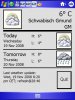
Hi digitaldon37,

thank you, very good work.


Ciao,
Filippo
Attached Images
File Type: jpg capture001.jpg (49.7 KB, 28 views)
__________________
PPC: MDA Pro, 2GB SD
PPC: HTC Touch Diamond, 4GB
______________________
Reply With Quote
  #20 (permalink)  
Old 11-20-2008, 06:53 AM
Basic4ppc Veteran
 
Join Date: Jul 2008
Location: Schwäbisch Gmünd
Posts: 265
Default

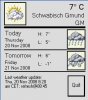
Hi digitaldon37,

very nice work!

Do you also want to have it in other languages (German)?
Attached Images
File Type: jpg Wetter.jpg (23.2 KB, 12 views)
__________________
JOTHA | Greetz from the Schwabenländle.
PPC: AMEO (HTC ADVANTAGE X 7500)
Reply With Quote
Reply


LinkBacks (?)
LinkBack to this Thread: http://www.basic4ppc.com/forum/open-source-projects/3323-pocket-weather.html
Posted By For Type Date
1800 PocketPC - Pocket Pc Freeware and Windows Mobile 6 Software - Part 2 This thread Refback 11-24-2008 11:40 AM
Pocket Forecast [v.25] (formerly Pocket Weather) - xda-developers This thread Refback 11-17-2008 10:17 PM
Currently Active Users Viewing This Thread: 1 (0 members and 1 guests)
 
Thread Tools
Display Modes

Posting Rules
You may not post new threads
You may not post replies
You may not post attachments
You may not edit your posts

vB code is On
Smilies are On
[IMG] code is On
HTML code is Off
Trackbacks are On
Pingbacks are On
Refbacks are On

Similar Threads
Thread Thread Starter Forum Replies Last Post
Another Pocket Wiki digitaldon37 Open Source Projects 4 12-30-2009 02:12 AM
Personal Pocket PC Wiki tsteward Open Source Projects 133 02-24-2009 10:01 AM
Pocket Burning Sand neilnapier Questions & Help Needed 2 11-05-2007 07:53 PM
print class for pocket pc tanrikuluahmet Basic4ppc Wishlist 1 10-01-2007 09:10 AM
Weather web service using HTTP lost2 Share Your Creations 3 06-10-2007 02:40 PM


All times are GMT. The time now is 04:24 PM.


Powered by vBulletin® Version 3.6.12
Copyright ©2000 - 2010, Jelsoft Enterprises Ltd.
Search Engine Friendly URLs by vBSEO 3.3.0