Basic4ppc - Windows Mobile Development  

Go Back   Basic4ppc - Windows Mobile Development > Main Category > Open Source Projects
Home Register FAQ Members List Search Today's Posts Mark Forums Read

Open Source Projects The place to discuss Basic4ppc open source applications.


Pocket Weather


Reply
 
LinkBack (2) Thread Tools Display Modes
  2 links from elsewhere to this Post. Click to view. #1 (permalink)  
Old 11-12-2008, 03:57 AM
Basic4ppc Veteran
 
Join Date: Jan 2008
Posts: 210
Default Pocket Forecast (formerly Pocket Weather)

Current Version: 1.2.5

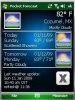
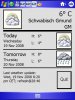
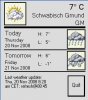
Description: Pocket Forecast is a weather application that supports mutliple locations, multiple languages, QVGA AND VGA display, cached AND user defined updates, customized theme, AND is open source written in Basic4PPC.

Source code and CAB installer at: pocket_forecast [CampusBBS Wiki]

Last update: 6/4/09
Attached Images
File Type: jpg pf-main.jpg (22.8 KB, 92 views)

Last edited by digitaldon37 : 06-04-2009 at 06:29 PM.
Reply With Quote
  #2 (permalink)  
Old 11-12-2008, 05:51 PM
Basic4ppc Veteran
 
Join Date: Jan 2008
Posts: 210
Default FilesEx error

I am getting an error while reading a file's attributes with the FilesEx library - but only when I run a compiled version. I don't get the error from within the IDE. Any ideas?

The GetYahooRSS code (with some msgbox's to display steps):
Code:
If FileExist(AppPath & "\" & CurrentLocationCode & ".cache") = True Then
		' Requires FilesEx library - agraham
		Msgbox("creating reference to FilesEx library...")
		filb.New1
		Msgbox("getting file attributes via FilesEx library...")
		fileInfo()=filb.FileInfo(AppPath & "\" & CurrentLocationCode & ".cache")
		' Msgbox(filb.Dllversion)
		Msgbox("splitting file into into array...")
		arrDateTime()=StrSplit(fileInfo(2))
		Msgbox("comparing file datestamp with current date...")
It errors at the "fileInfo()=filb.FileInfo" line.

UPDATE: Never mind. I was using version 1.2 of the FilesEx library and the current one is 1.3 - the latest version fixes this.

Last edited by digitaldon37 : 11-12-2008 at 07:05 PM.
Reply With Quote
  #3 (permalink)  
Old 11-14-2008, 12:50 AM
Basic4ppc Veteran
 
Join Date: Jan 2008
Posts: 210
Default Pocket Weather v.16

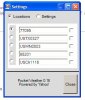
With version .16 I have a usable weather application that supports up to 5 locations. I am currently working on the settings editor (accessible by clicking on the tiny weather icon next to the "Last update" status on the main page) but I have enough working that multiple locations can be loaded from the INI file and the default location (ie the one that is in view) can be changed.

Changes are not saved when the program exits - that is the code I am currently working on. Any feedback is welcome - I took the comments made on other weather applications and used those as functional requirements.

Update: Location & Settings completed, uploading v.17 on 1st post
Attached Images
File Type: jpg pocket_weather_locations.JPG (17.6 KB, 96 views)

Last edited by digitaldon37 : 11-14-2008 at 02:04 AM.
Reply With Quote
  #4 (permalink)  
Old 11-14-2008, 03:08 PM
Basic4ppc Veteran
 
Join Date: Jan 2008
Posts: 210
Default Need help with bug (form control values "lost")

I have a bug that I haven't been able to track down yet. When clicking on the "Close" button on the configuration screen, the application updates global variables for location id, theme, timeouts, etc and then updates the INI file.

The problem is that (3) variables (for theme, http, refresh) are updated with no values. I am using the form controls values to update the global variables, so I am at a lost why some work and some don't.

As a temporary solution, I added a code check to see if the form controls are empty and then update the global variable only if there is a value, but this isn't the best solution since some of those controls get updated.

I've uploaded the latest code (v.19) on the 1st post if anyone can help.
Reply With Quote
  #5 (permalink)  
Old 11-14-2008, 08:20 PM
Erel's Avatar
Administrator
 
Join Date: Apr 2007
Posts: 4,533
Awards Showcase
Basic4ppc Founder 
Total Awards: 1
Default

Looks like a great program
How can I get to the configuration page?
__________________
Basic4ppc reference list
Reply With Quote
  #6 (permalink)  
Old 11-14-2008, 11:11 PM
Basic4ppc Veteran
 
Join Date: Jan 2008
Posts: 210
Default

Quote:
Originally Posted by Erel View Post
Looks like a great program
How can I get to the configuration page?
Thanks for the feedback.

You get to the configuration screen by pressing the tiny weather icon near the status message on the main page.
Reply With Quote
  #7 (permalink)  
Old 11-15-2008, 01:10 AM
Basic4ppc Veteran
 
Join Date: Jan 2008
Posts: 210
Default version .20

(cross posted at xda-developers.com)

Version .20 has been uploaded to the main post.

1. Portrait/Landscape mode (repaint screen when switching between two)
2. Finger-swipe down opens configuration screen (the tiny weather icon is still there until this is fully tested)
3. Button and misc. messaging changes (per suggestions)
4. Cache (if available) is loaded on application start-up - updates can be done manually or configured every X minutes
5. Location cache are deleted if the location/zip code is deleted
6. RetrieveRSS functions (remote/local) rewritten

Next to do: apply theme settings (theme.ini)
Reply With Quote
  #8 (permalink)  
Old 11-15-2008, 04:44 AM
Erel's Avatar
Administrator
 
Join Date: Apr 2007
Posts: 4,533
Awards Showcase
Basic4ppc Founder 
Total Awards: 1
Default

Weather.jpg should be located under gfx folder instead of the root folder.
Code:
    ' application image buttons
    If FileExist(AppPath & "\gfx\weather.jpg") Then
        imgHotKey.Image=AppPath & "\gfx\weather.jpg"
    End If
__________________
Basic4ppc reference list
Reply With Quote
  #9 (permalink)  
Old 11-15-2008, 05:45 AM
Erel's Avatar
Administrator
 
Join Date: Apr 2007
Posts: 4,533
Awards Showcase
Basic4ppc Founder 
Total Awards: 1
Default

You are only updating the three variables when the user presses on rbtnSettings.
If the user just opens the settings page and closes it these three variables will not be updated.
Here is a possible solution:
Code:
Sub editLocations
    rbtnLocations.Checked=True
    pnlLocations.Enabled=True
    pnlLocations.Visible=True
    pnlSettings.Enabled=False
    pnlSettings.Visible=False
    
    lblDefault.Visible=True
    lblLocationDescription.Visible=True
    lblDelete.Visible=True
    Select CurrentLocationCode
        Case Location(0)
            rbtnLocation1.Checked=True
        Case Location(1)
            rbtnLocation2.Checked=True
        Case Location(2)
            rbtnLocation3.Checked=True
        Case Location(3)
            rbtnLocation4.Checked=True
        Case Location(4)
            rbtnLocation5.Checked=True
    End Select
    
    form3.show
End Sub
Sub editSettings
    rbtnSettings.Checked=True
    pnlSettings.Enabled=True
    pnlSettings.Visible=True
    pnlLocations.Enabled=False
    pnlLocations.Visible=False
    lblDefault.Visible=False
    lblLocationDescription.Visible=False
    lblDelete.Visible=False

    Select ini.mainWeatherUnits
        Case "c"
            rbtnCelcius.Checked=True
        Case "f"
            rbtnFarenheit.Checked=True
    End Select
    form3.Show
End Sub
Sub updateSettings
    txtThemeSetting.Text=INI.themeDir
    txtHttpSetting.Text=INI.httpTimeout
    txtRefreshSetting.Text=INI.refreshInterval
    txtLocation1.Text=Location(0)
    txtlocation2.Text=Location(1)
    txtLocation3.Text=Location(2)
    txtLocation4.Text=Location(3)
    txtLocation5.Text=Location(4)
End Sub
Sub Form3_Show
    updateSettings
End Sub
If you like you can use an ImageList and add all your images to this list.
That way the images will be merged in the executable.
__________________
Basic4ppc reference list
Reply With Quote
  #10 (permalink)  
Old 11-15-2008, 11:59 AM
Basic4ppc Veteran
 
Join Date: Jan 2008
Posts: 210
Default

Thanks Erel for looking through the code and for the suggestion. I am going to make those changes and test it out.

I didn't want to merge the images into the executable because I want to give users (of the compiled version) to be able to use different sets of weather images - part of how themes will be implemented.

The customer service and community forums are reasons why B4PPC is such a great product!
Reply With Quote
Reply


LinkBacks (?)
LinkBack to this Thread: http://www.basic4ppc.com/forum/open-source-projects/3323-pocket-weather.html
Posted By For Type Date
1800 PocketPC - Pocket Pc Freeware and Windows Mobile 6 Software - Part 2 This thread Refback 11-24-2008 11:40 AM
Pocket Forecast [v.25] (formerly Pocket Weather) - xda-developers This thread Refback 11-17-2008 10:17 PM
Currently Active Users Viewing This Thread: 1 (0 members and 1 guests)
 
Thread Tools
Display Modes

Posting Rules
You may not post new threads
You may not post replies
You may not post attachments
You may not edit your posts

vB code is On
Smilies are On
[IMG] code is On
HTML code is Off
Trackbacks are On
Pingbacks are On
Refbacks are On

Similar Threads
Thread Thread Starter Forum Replies Last Post
Another Pocket Wiki digitaldon37 Open Source Projects 4 12-30-2009 02:12 AM
Personal Pocket PC Wiki tsteward Open Source Projects 133 02-24-2009 10:01 AM
Pocket Burning Sand neilnapier Questions & Help Needed 2 11-05-2007 07:53 PM
print class for pocket pc tanrikuluahmet Basic4ppc Wishlist 1 10-01-2007 09:10 AM
Weather web service using HTTP lost2 Share Your Creations 3 06-10-2007 02:40 PM


All times are GMT. The time now is 02:32 AM.


Powered by vBulletin® Version 3.6.12
Copyright ©2000 - 2010, Jelsoft Enterprises Ltd.
Search Engine Friendly URLs by vBSEO 3.3.0