
-
Welcome to B4X forum!
B4X is a set of simple and powerful cross platform RAD tools:
- B4A (free) - Android development
- B4J (free) - Desktop and Server development
- B4i - iOS development
- B4R (free) - Arduino, ESP8266 and ESP32 development
You are using an out of date browser. It may not display this or other websites correctly.
You should upgrade or use an alternative browser.
You should upgrade or use an alternative browser.
Using Diamond's Accelerometer
- Thread starter Mr_Gee
- Start date
- Similar Threads Similar Threads

You try this :sign0082: AT YOUR OWN RISK :sign0082: I've no idea if it will work. Best case it will work, probably it will fail benignly, at worst you will need to hard reset your device and reinstall everything!
The original code required VS2008 and the WM6.0 SDK, neither of which I have. However I stripped out the device orientation bits of code, which won't compile with my system ,and and compiled the rest under VS2005 for WM5.0 devices. I can't test the code but it is pretty simple.
Make a HTCGSensor object and New it. Then call GetRawSensorData whenever you want to get the data. The data is returned relative to the screen face.
Dim data(0)
...
HTCGSensor.New
...
data() = HTCGSensor.GetRawSensorData
In the unlikely event that it works the data is returned in a 20 byte array described in the struct at the start of the source file in the zip. You can reassemble the data the hard way by multiplying and adding bytes or by using my ByteConverter library http://www.b4x.com/forum/additional-libraries/2565-byteconverter-library.html
The original code required VS2008 and the WM6.0 SDK, neither of which I have. However I stripped out the device orientation bits of code, which won't compile with my system ,and and compiled the rest under VS2005 for WM5.0 devices. I can't test the code but it is pretty simple.
Make a HTCGSensor object and New it. Then call GetRawSensorData whenever you want to get the data. The data is returned relative to the screen face.
Dim data(0)
...
HTCGSensor.New
...
data() = HTCGSensor.GetRawSensorData
In the unlikely event that it works the data is returned in a 20 byte array described in the struct at the start of the source file in the zip. You can reassemble the data the hard way by multiplying and adding bytes or by using my ByteConverter library http://www.b4x.com/forum/additional-libraries/2565-byteconverter-library.html
Attachments
IF it works you'll have to play, I don't really know myself. From the source
B4X:
public short TiltX;   // From -1000 to 1000 (about), 0 is flat
public short TiltY;   // From -1000 to 1000 (about), 0 is flat
public short TiltZ;   // From -1000 to 1000 (about), 0 = Straight up, -1000 = Flat, 1000 = Upside down
public short Unknown1;  // Always zero
public int AngleY;  // From 0 to 359
 public int AngleX;  // From 0 to 359
public int Unknown2; // Bit field?Hi agraham,
Just got my t-Mobilized Diamond so I though i'd give this a go.
In the IDE I made a form and included the HTCSensor.dll
when hitting F5 i get the following error
- unable to find an entry point named HTCSendorOpen in DLL HTCSensorSDK
next I copy pasted Sensor.DLL and renamed it to HTCSensorSDK.DLL
That didn't help...

Just got my t-Mobilized Diamond so I though i'd give this a go.
In the IDE I made a form and included the HTCSensor.dll
when hitting F5 i get the following error
- unable to find an entry point named HTCSendorOpen in DLL HTCSensorSDK
next I copy pasted Sensor.DLL and renamed it to HTCSensorSDK.DLL
That didn't help...
I assume you mean "HTCSensorOpen". Do you have an HTCSensorSDK.dll file on the device? That message might mean the dll was found but lacked the required entry point.- unable to find an entry point named HTCSendorOpen in DLL HTCSensorSDK
Googling I found this "But HTCSensorSDK.dll is on ROM (I think) and not removeable" which implies that it should be on the device. I am afraid that I can't be of further help. The code requires that entry point in that dll.
Yes I did, sorry..
I found the HTCSensorSDK.DLL on my device, so I copied it to the same dir as the sbp file.
next I change the sbp file to :
and it states "WindowsMobile.Sensor.HTCGSensor" in the popupbox
when I use the GetRawSensorData I get a "NotSupportedException"
Does that help you in any way?
I found the HTCSensorSDK.DLL on my device, so I copied it to the same dir as the sbp file.
next I change the sbp file to :
B4X:
Sub App_Start
   Form1.Show
   sen.New1
   'TextBox1.Text = sen.GetRawSensorData
   Msgbox(sen.ToString)
End Subwhen I use the GetRawSensorData I get a "NotSupportedException"
Does that help you in any way?
Ih has found the dll and the intialisation entry point or it wouldn't have got that far.
Any further information with that exception? That message is the exception type, I would have expected an additional message as well.when I use the GetRawSensorData I get a "NotSupportedException"
No there is nothing else.. I've attached a screenshotIh has found the dll and the intialisation entry point or it wouldn't have got that far.
Any further information with that exception? That message is the exception type, I would have expected an additional message as well.
I've used "TextBox1.Text = sen.ToString(sen.GetRawSensorData)" in this case
but to be sure i also did TextBox1.Text = sen.GetRawSensorData
same result
Attachments
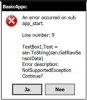
Wrong! There is a lot more information there. It shows how important it is to describe exactly and in detail rather than just saying an exception occurred.No there is nothing else
I think that the dll might actually be working, it is your code that is trying to use the returned information incorrectly. From my earlier post
You have to assign the returned data to an array and pick it apart from there. The array will be an array of bytes that you have to transform to the required numbers. With my ByteConverter library it looks likes this (there may be typos/errors, I haven't actually tried the code).Dim data(0)
...
HTCGSensor.New
...
data() = HTCGSensor.GetRawSensorData
In the unlikely event that it works the data is returned in a 20 byte array described in the struct at the start of the source file in the zip. You can reassemble the data the hard way by multiplying and adding bytes or by using my ByteConverter library
B4X:
TiltX = ByteConv.Int16FromBytes(data(), 0) ' From -1000 to 1000 (about), 0 is flats
TiltY = ByteConv.Int16FromBytes(data(), 2) ' From -1000 to 1000 (about), 0 is flatshort
TiltZ = ByteConv.Int16FromBytes(data(), 4) ' From -1000 to 1000 (about), 0 is flat
Unknown1 = ByteConv.Int16FromBytes(data(), 6) ' Always zero
AngleY = ByteConv.Int32FromBytes(data(), 8) 'From 0 to 359
AngleX = ByteConv.Int32FromBytes(data(), 12) 'From 0 to 359
Unknown2 = ByteConv.Int16FromBytes(data(), 16) ' Bitfield?Wrong! There is a lot more information there. It shows how important it is to describe exactly and in detail rather than just saying an exception occurred.
Sorry you are right, I think I was just to eager to get started...
I started again from scratch
B4X:
Sub Globals
   Dim data(0)
End Sub
Sub App_Start
   Form1.Show
End Sub
Sub Button1_Click
   HTCGSensor.New1
   data() = HTCGSensor.GetRawSensorData
   Msgbox(ArrayLen(data()))
End SubAn error occured on sub button1_click
Line number : 15
data() = HTCGSensor.GetRawSensorData
Error description :
NotSupportedException
Last edited:
Pity it doesn't tell us what is not supportedNotSupportedException
I can't see anything wrong with the code (it's only three lines long!), but I can't test it as I haven't an HTC device. I've done the same thing the long way round with this second attempt. If this doesn't work then I am afraid that I am out of ideas without having a device to play with.
Attachments
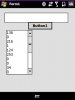
guess what... i'm getting data back!
msgbox(ArrayLen(data())) is giving 20
and sending the data to a listbox is also working
Now for the hard part processing the data...
I have no idea where to start :sign0013:
I get a list of values, none of them are negative so the stuff you posted in post#4 cannot be used directly... but i'm pretty sure i'm missing something
is this something that can be deducted using your byteconverter lib?
edit added image
Attachments
Last edited:
You will need to play. Add my ByteConverter library as a component, make an object called ByteConv and use the code I posted in #11 to take the data apart. You won't see those values I posted in #4 until you have parsed the data back into the correct format.is this something that can be deducted using your byteconverter lib?
Hi agraham,
I tried this dll on my Omnia I900 but as I expected it does not work (Cannot find PInvoke-DLL HTCSensorSDK) on a Omnia.
Now Koush wrote on his site:
Any change you could make your sensor.dll also work on an Omina?
Scub.
I tried this dll on my Omnia I900 but as I expected it does not work (Cannot find PInvoke-DLL HTCSensorSDK) on a Omnia.
Now Koush wrote on his site:
The GSensor API now supports the Samsung Instinct/Omnia!
Any change you could make your sensor.dll also work on an Omina?
Scub.
Sorry but it is too big a job at the moment. The original code is a Visual Studio 2008 project which I can't load in my VS2005 so I had to start the HTC library project from scratch. What's more difficult is that I don't have a Samsung device for testing whereas I do have an HTC Diamond.Any change you could make your sensor.dll also work on an Omina?
Incidentally, for anyone else reading this, this thread is effectively closed and the latest library is here http://www.b4x.com/forum/additional-libraries/3237-htcsensors-library-htc-diamond.html#post18032