Download the free trial version
Basic4android Video
Features
Tutorials and manuals
Showcase
Screenshots

Go Back   Android Development Forum - Basic4android > Basic4ppc (Windows Mobile) > Share Your Creations
Documentation Wiki Register Members List B4P Search Today's Posts Mark Forums Read

Share Your Creations Show your developed application to Basic4ppc community. Please include source code if possible.

Calendar App

Reply
 
LinkBack Thread Tools Display Modes
  #1 (permalink)  
Old 09-29-2009, 01:51 AM
Senior Member
 
Join Date: Apr 2007
Location: Arlington, Washington USA
Posts: 180
Default Calendar App

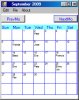
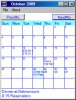
This calendar app display's a month's worth of appointments on a single calendar page. Necessarily, the entries must be short. I looked and looked for an existing app that would do this, and finally gave up and wrote this one.

I wrote this to keep track of my bridge appointments (see attached screenshot) and it does this quite well. It may, however, be of interest to others so I am posting it here.

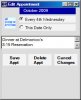
The app can schedule two types of appointments: reoccuring, and static (1-time appointments). The reoccuring appointments are of the form Every 2nd Wednesday, Every 4th Friday, etc. The appointments will be displayed in the proper location as you scroll forward or backward through the months. Static appointments only appear on the date selected and may be used to override a scheduled reoccuring appointment.

The app supports two lines of text per day, each line must be quite short or the text will scroll and perhaps be unreadable.

You can keep more than one calendar (I have one for bridge and one for the rest of my life). You may choose which calendar gets loaded as the default.

Although the interface may appear somewhat idiosyncratic, it's not hard to figure out and use. The app works quite well on my Omnia 910 and is quite readable.
Attached Images
File Type: jpg ViewCal.jpg (52.8 KB, 158 views)
Attached Files
File Type: zip ViewCal.zip (40.2 KB, 95 views)

Last edited by dlfallen : 10-03-2009 at 05:23 AM. Reason: Fix bug in program
Reply With Quote
  #2 (permalink)  
Old 10-02-2009, 08:34 AM
Ariel_Z's Avatar
Basic4ppc Veteran
 
Join Date: May 2009
Posts: 246
Default

Beautiful and very handy I liked the ability to get a glance of a whole month. It is hard to find such apps.
A couple of things I ran into:
1. When deleting the last row an error occurs.
2. When deleting the last row, ignoring the error, and adding a row, the value of the text of the previously deleted row appears. Is it on purpose?
3. Ideas I had while looking:
a. you can add a "long description field" so that it appears on the details form only (short desc. is a very good idea for the display)
b. can double click be used to open the relevant event?
c. is it possible to update an event?

BTW - ran it only on desktop but it appears a bit cut on the right side - 2- 3 pixels - is it
ok on yours?

Ariel
Reply With Quote
  #3 (permalink)  
Old 10-02-2009, 05:32 PM
Senior Member
 
Join Date: Apr 2007
Location: Arlington, Washington USA
Posts: 180
Default

Thanks for the feedback. To answer your questions:

(1) Clearly a bug, I'll fix it.

(2) No, it is not on purpose but when I fix (1) then this problem can't occur.

(3a) This could be added, but only to the appointment forms. Ideally, one could click on the calendar display and the expanded text would show at the bottom. But I used stock labels to build the calendar and they are not clickable. I've given some thought to using the clickable label but haven't had the time to "enjoy" the learning curve necessary to implement this. If/when I do the whole interface (but not the calendar display) will change.

(3b) I'm not sure what you mean by "open an event". If you mean edit it, you can do that on the appointment pages. But again, you cannot initiate an edit by clicking or double clicking on the calendar form because the labels do not implement the click event.

(3c) You can update an event on the appointment page. Click on the row to be edited and the appointment text will appear in the text box below. After editing in the text box, click OK.

Now that you mention it, my desktop display is also "cut" -- but on both sides. What I see is that the blue vertical lines do not appear on either side. On the device, I can see the blue lines on the right but not on the left. I'm inclined to leave it this was as it does not bother me any and I'm afraid if I shrink the boxes to allow the lines to be seen it will have a negative effect on the amount of text displayable within those labels.

I'll do the bug fixes right away, and consider expanded appointment information if that doesn't lead to problems.

Thanks again.

Last edited by dlfallen : 10-02-2009 at 05:51 PM. Reason: Add information
Reply With Quote
  #4 (permalink)  
Old 10-02-2009, 06:34 PM
agraham's Avatar
Basic4ppc Expert
 
Join Date: Jul 2007
Location: Cheshire, UK
Posts: 6,072
Awards Showcase
Innovator medal Beta Tester Forum Contributer 
Total Awards: 3
Default

Quote:
Originally Posted by dlfallen View Post
Now that you mention it, my desktop display is also "cut" -- but on both sides.
There is a long standing bug on the desktop (as long as I've been using Basic4ppc) that does not set the client area size of a form correctly as it does not properly take into account the size of the window border when sizing the form. To get a correct sized form when optimised compiled (the IDE is still off) I have patched the *.cs files on my system that optimised compilation uses and passed the changes to Erel who indicated that it should get fixed in the next version.
__________________
Sorry, but I don't answer questions by PM or email.
Please post your queries in the forum.
Reply With Quote
  #5 (permalink)  
Old 10-03-2009, 05:27 AM
Senior Member
 
Join Date: Apr 2007
Location: Arlington, Washington USA
Posts: 180
Default

I fixed the bugs found by Ariel Z. The Zip file in the original post has been replaced with one with updated source and .exe files.

I do realize the program would be much more useful to others if there were an expanded appointment description capability. It's on my list but won't happen too soon.

-Dave
Reply With Quote
  #6 (permalink)  
Old 10-16-2009, 05:09 AM
Senior Member
 
Join Date: Apr 2007
Location: Arlington, Washington USA
Posts: 180
Default

I have implemented Ariel Z's suggestions which took much longer to code than the original version. I ran into several "opportunities to learn"; fortunately agraham is a great teacher.

The net result (pun intended) is a program that is much more intuitive and user-friendly. Here are the highlights of Version 2:

(1) Added a long text description box below the calender.
(2) Selected date is highlighted.
(3) Menu structure is simplified.
(4) Double clicking on a date initiates edit mode (the program recognizes whether the existing appointment is one-time or reoccuring).
(5) Changes are automatically saved.
(6) On the device, the SIP is automatically shown or hidden, as appropriate.

The new version retains the ability to maintain multiple calendars. All files (calendars, configuration file) are stored in AppPath.

When saving a file, the character "^" is used as a marker for CRLF and "`" is a marker for a comma (unlike the previous version which did not support commas in the text). This means, of course, these two characters cannot be used in the text.

I appreciate all the help and suggestions. Is this a great forum or what?
Attached Images
File Type: jpg ScreenShot1.jpg (56.8 KB, 47 views)
File Type: jpg ScreenShot2.jpg (42.0 KB, 60 views)
Attached Files
File Type: zip ViewCal2.zip (51.0 KB, 85 views)
Reply With Quote
  #7 (permalink)  
Old 10-17-2009, 03:48 PM
klaus's Avatar
Basic4ppc Expert
 
Join Date: Oct 2007
Location: Fully, Switzerland
Posts: 4,463
Awards Showcase
Forum Contributer Beta Tester Competition Winner 
Total Awards: 3
Default

I have tried your program, it has become quite interesting.

One suggestion: a repetitive appointment every week would also be intersting.

I ran the program on my htc-Touch HD device with a 480/800 screen Autoscale compiled. Unfortunately the LinkLabel object doesn't support autoscale.
Attached a screenshot.

For devices with 240/400 or 480/800 screens there would be room for a 3rd line of text per day.

Best regards.
Attached Images
File Type: jpg ViewCal_VGA.JPG (40.0 KB, 47 views)
__________________
Klaus
Switzerland

Beginner's Guide / User's Guide
Reply With Quote
  #8 (permalink)  
Old 10-17-2009, 05:35 PM
Senior Member
 
Join Date: Apr 2007
Location: Arlington, Washington USA
Posts: 180
Default

A weekly appointment capability is a good suggestion, and it shouldn't be difficult to implement. Another enhancement would be the ability to delete one-time appointments from previous months. This would keep the table that stores that information to a minimum.

My Omnia would be capable of showing several lines of text. I wrote it for two lines so as to make it useful on most any device. One thing I might play with is making the number of lines user selectable. Might be kind of useful at that.

Kindest regards,
Dave
Reply With Quote
  #9 (permalink)  
Old 10-17-2009, 05:44 PM
agraham's Avatar
Basic4ppc Expert
 
Join Date: Jul 2007
Location: Cheshire, UK
Posts: 6,072
Awards Showcase
Innovator medal Beta Tester Forum Contributer 
Total Awards: 3
Default

Quote:
Originally Posted by klaus View Post
Unfortunately the LinkLabel object doesn't support autoscale.
It does now .
Attached Files
File Type: zip LinkLabel1.1.zip (3.8 KB, 70 views)
__________________
Sorry, but I don't answer questions by PM or email.
Please post your queries in the forum.
Reply With Quote
  #10 (permalink)  
Old 10-18-2009, 06:48 AM
klaus's Avatar
Basic4ppc Expert
 
Join Date: Oct 2007
Location: Fully, Switzerland
Posts: 4,463
Awards Showcase
Forum Contributer Beta Tester Competition Winner 
Total Awards: 3
Default

Thank's Andrew,

Works fine.

Best regards.
__________________
Klaus
Switzerland

Beginner's Guide / User's Guide
Reply With Quote
Reply


Currently Active Users Viewing This Thread: 1 (0 members and 1 guests)
 
Thread Tools
Display Modes

Posting Rules
You may not post new threads
You may not post replies
You may not post attachments
You may not edit your posts

vB code is On
Smilies are On
[IMG] code is On
HTML code is Off
Trackbacks are Off
Pingbacks are Off
Refbacks are On

Similar Threads
Thread Thread Starter Forum Replies Last Post
Calendar format skipper Questions (Windows Mobile) 2 06-12-2009 01:45 AM
Calendar Problem! superbabicka Questions (Windows Mobile) 3 04-05-2008 09:15 AM
Calendar Recorder Rioven Share Your Creations 5 10-21-2007 06:55 AM
Calendar event Rioven Questions (Windows Mobile) 7 08-28-2007 07:00 AM
Calendar control BjornF Questions (Windows Mobile) 7 07-05-2007 07:52 AM


All times are GMT. The time now is 12:20 PM.


Powered by vBulletin® Version 3.6.12
Copyright ©2000 - 2012, Jelsoft Enterprises Ltd.
Search Engine Friendly URLs by vBSEO 3.3.0